
seven integrated with K4
Unique publishing workflow
One of the most compelling examples of a profitable content supply chain is the integration of vjoon seven with vjoon K4 – probably the smartest connection between a digital asset management platform and a publishing system. All features of the integration are implemented as standard functions and are therefore immediately available to customers.
Thanks to this integrated content supply chain, you can create, manage and provide content even more efficiently.
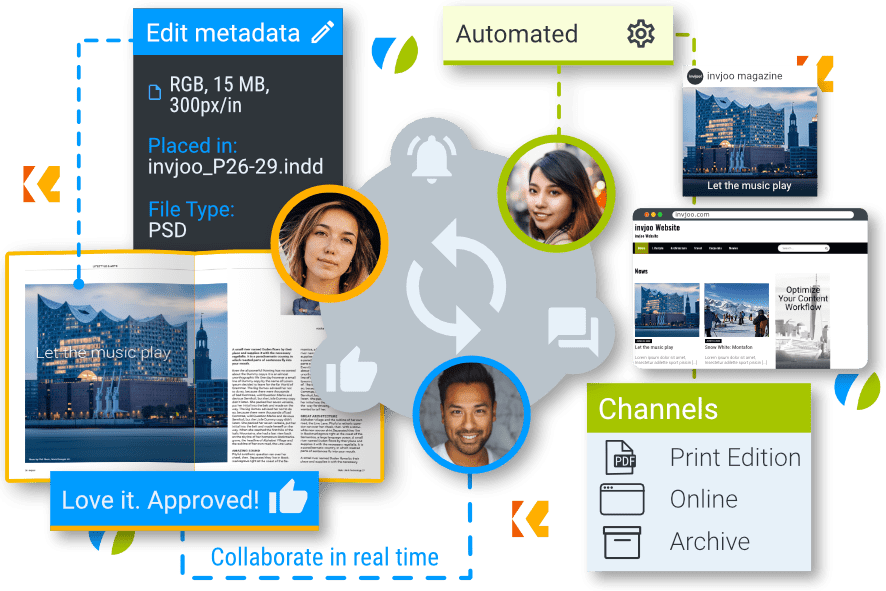
Drive your (integrated) content supply chain.
Are you already using K4 for your multichannel publishing? Perfect, because then your content workflow is probably already streamlined and highly automated. But of course, there is always room for improvement, and with a deeply integrated DAM such as vjoon seven, you could manage your content supply chain in K4 and throughout your entire company even more efficiently. Whether you want to use seven DAM as a central content hub in your company and extend it with K4 to provide editorial content, or add smart media management to your productions in K4, seven is versatile and you decide how to use it. And if you want, you can get started right away, because the integration of seven with K4 is already included as a standard feature.
Find out here how integrating K4 with seven allows you to create, manage, and provide content even more efficiently for every output channel.

Create
content even more efficiently
Whether your strategy is content-first, online-first or print-first, vjoon K4 supports you in creating stories that engage your audience. Published on the many digital platforms as well as in print. K4 ensures that the entire team collaborates efficiently and that all versions of content find their way into the system – whether you are in the office, at home or on the road. All your team members, managers and, of course, freelancers will love K4 just for that.
- Boost editorial collaboration
- Create stories and layouts that inspire
- Review and approve content with ease
- Publish for print and digital
- Access anytime from anywhere

Manage
content even more efficiently
With seven, manage all assets centrally. Images from agencies or photographers can be uploaded directly and effortlessly – with duplicate detection and, if required, automated AI tagging. At a glance, you can find all variants, versions, relationships between them, and proof of use where the asset has already been used. From seven, you can control usage rights and thus usage in K4 layouts.
- Manage all digital assets centrally
- Make AI usable across the entire organization
- See where an asset is used
- Reference placed assets by URL
- Control the usage rights of an asset

Provide
content even more efficiently
With seven, you always have the right resolution and format at your fingertips by providing renditions automatically or on demand. Publishing via web CMS, such as WordPress, becomes a breeze, whether from K4 or directly from seven. Build a fully automated, structured, searchable digital archive from which you can easily reuse content — and keep your K4 database lean.
- Provide tailored renditions
- Leverage integrations with WordPress
- Build a centralized and individual digital archive
- Browse archived content
- Monetize content multiple times
Q&A about seven integrated with K4
You may have more questions about our Integrated Content Supply Chain solution, so we've answered the most frequently asked questions that have come up in customer conversations alongside.
Do I need to purchase a separate module to take advantage of this integration?
No, you don't need to purchase anything extra. The integration of seven with K4 comes as a standard feature of both systems. Customers benefit from the advantages of integration from day one and can take-off immediately.
What makes this integration so effective?
Systems that are connected at a later stage or from different vendors often generate few benefits, as the integrations are limited to a few standard features. But if both systems are from the same vendor right from the start, the advantages are obvious. Both systems can be matched to each other in an almost perfect harmony.
With vjoon solutions, this can be seen in many areas, such as where-used lists, linked assets, QuickLoad feature, the use of metadata, controlling the right to use images, the digital archive and much more.
Can I also use the DAM as a digital archive for my publications produced in the publishing system?
Of course. The integration of seven with K4 allows you to build your own archive of digital content. You can manually or automatically import single files or complete brands, projects and teams.
In vjoon seven, you can then use your digital archive to serve one or more of the following purposes:
- Auditing acceptability: Store files for final disposition that cannot be changed.
- Viewing completed productions: Once a production is done, trace, which content has been produced when, where and in which context.
- Reusing content: Create new content based on archived assets.
Are your solutions run on-premises or in the cloud?
You are free to choose. vjoon seven and K4 can be deployed entirely in the cloud, or in an existing IT infrastructure, in the enterprise, in distributed locations, and in external data centers. When deployed in the cloud, you choose your preferred cloud service provider, according to national data protection policies, individual security requirements, or to meet your corporate compliance management. If you have any further questions, our partners will be happy to advise you.
What is vjoon’s experience in this area?
Sophisticated software with high quality is our DNA. Since our founding in 1990, we have pursued the goal of providing our customers with solutions that noticeably improve their content management. As the first provider of an Adobe InDesign based publishing system, we have brought many innovations to the market and are one of the market leaders in our segment today. With our worldwide partner network, we offer both strong local partners and the expertise for global roll-outs and support. Brands, creative agencies, publishers, government institutions and associations of all sizes trust in us and our partners.
Ready for take-off?
Bring your content management to the next level with vjoon.
Our experts will be happy to discuss your challenges and give you a personal demo.
Create content even more efficiently

Two solutions.
Unique workflow.
When creating content, users benefit from the advantages of a powerful publishing system and the possibilities of a next-generation DAM. In addition to the typical features of their respective areas, users also benefit from features that are only possible through integration.

Find and use the assets you need faster
Thanks to centralized management based on metadata, high-performance search, and additional filters, you can find the images, graphics, videos, and much more you need much faster than in traditional file systems. Place assets found in seven directly onto your layout using drag & drop — quickly and easily. Referencing is done via a URL, which makes mounting traditional storage drives and cloud storage completely unnecessary.

Share collections with your team
With seven, you can structure and organize your files according to your team‘s workflow. Share and organize content for a project, research for a story, campaign, or photo shoot in collections. Assets can also be included in multiple collections without being duplicated in the system. Determine which individuals or groups are allowed to access these collections, e.g., a specific editor, the team working on a project, or a department.
Edit assets managed in seven directly
Thanks to smart integration with Adobe Creative Cloud, you can always edit assets directly and securely in the appropriate application. For example, open an image placed from seven via drag & drop directly from InDesign. seven ensures that only you can make changes to the opened file. And when you‘re done, the image always finds its way back to seven securely and versioned, and the new version is displayed in InDesign. Of course, the same works for changes made directly from seven.
Fast, high-quality previews with QuickLoad
When working with large image files in InDesign, downloading can take a long time, especially if you are working in a cloud-based or external network with low bandwidth. Standard preview images are too low-resolution to evaluate accurately, and loading all high-resolution images is a time-consuming process. The unique QuickLoad feature in vjoon seven remedies this and speeds up your creative work.
Manage content even more efficiently

Manage all your digital assets centrally
vjoon seven transforms your files into valuable business information, as their metadata can be used to better organize and utilize content. Metadata makes content searchable, creates structures, and provides valuable information for interaction with third-party systems. With seven, you can manage all assets for your editorial, marketing, and corporate communications teams in a single source of truth. For example, you can quickly find the right image, see where it has been used before, and control usage rights.

Make AI usable across your entire organization
Integrate AI effortlessly with K4 or seven and reap the enormous benefits. Tag images, transcribe audio files, or translate documents, articles, and financial reports with ease using AI — all with AI embedded in the workflow and highly automated. What‘s more, thanks to deep integration with Adobe Creative Cloud, you also benefit from all the creative AI power in Photoshop, Illustrator, and InDesign.
See exactly where an asset is used
Establishing relationships between assets and making them visible is fundamental to asset management. In seven, for example, you can see which images have been used in a layout or which variants of an image exist. And all relationships are clickable links, making it very easy to navigate the relationship structure.
Reference placed assets via URL
Simply drag & drop assets from seven into your K4/InDesign layouts. Referencing is done via a URL, which significantly simplifies management and makes workflows much more efficient. All assets are always directly linked. Other InDesign users who, for example, work on the layout at a later stage in the workflow do not even need to be logged into seven to view and update a placed asset in the layout. No more missing images, no more broken paths, no more cumbersome mounting of file or cloud servers – with seven and K4, all that is a thing of the past.
Control the usage rights of an asset
Allow seven users to control the right to use an image in the layout. If a user decides that an asset in seven is no longer usable due to expired image rights or licenses, the user is notified in vjoon K4 by a clearly visible message and can no longer use the image.
Provide content even more efficiently
Provide precisely tailored renditions
Create different renditions of your assets. Use low-resolution images during the layout phase and high-resolution images when it comes to printing. But especially in digital channels, you need different formats that meet the relevant requirements. The creation and management of this huge number of different files alone requires an enormous amount of effort.
With “Renditions,” seven has an efficient answer to this challenge. These are automatically generated different representations, or renditions, of the same asset that have changed in terms of size, resolution, file format, or color space, for example.

Benefit from integrations with WordPress
Publish your content with WordPress at the touch of a button or via automated workflow tasks. While creating your content, K4 users can check how the story will look in WordPress using a preview rendered live by WordPress. Especially when publishing digital content, the seven renditions enable significant savings in the effort required to adapt the content.
Build an individual digital archive
Relieve K4 of all your previously published publications and all associated content. Build your own individual digital archive. Thanks to deep integration with K4, archiving can be easily configured as an automated task at the end of each production cycle.

Search archived content
The entire issue in K4, with all associated content, is imported into seven, including all layouts, assets, and relationships between them, so everything remains in a structured and searchable context. Even better, all relationships are clickable, allowing you to quickly access the relevant assets, variants, or collections you need.
Monetize content again
You can also repurpose stories that have already been archived. Simply download them and modify them to suit your needs. Stories that have performed well are given a second life and can be monetized again. It is precisely these features that make the digital archive in seven so valuable for your company.
Learn more about our solutions
vjoon seven
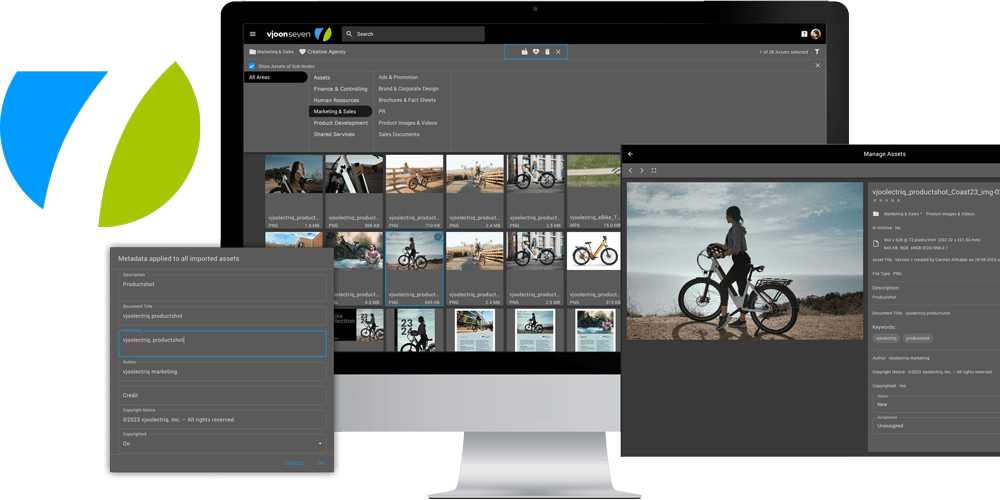
seven is your central content hub and single source of truth. Its intelligent use of metadata lets your assets become valuable parts of your brand.
vjoon K4
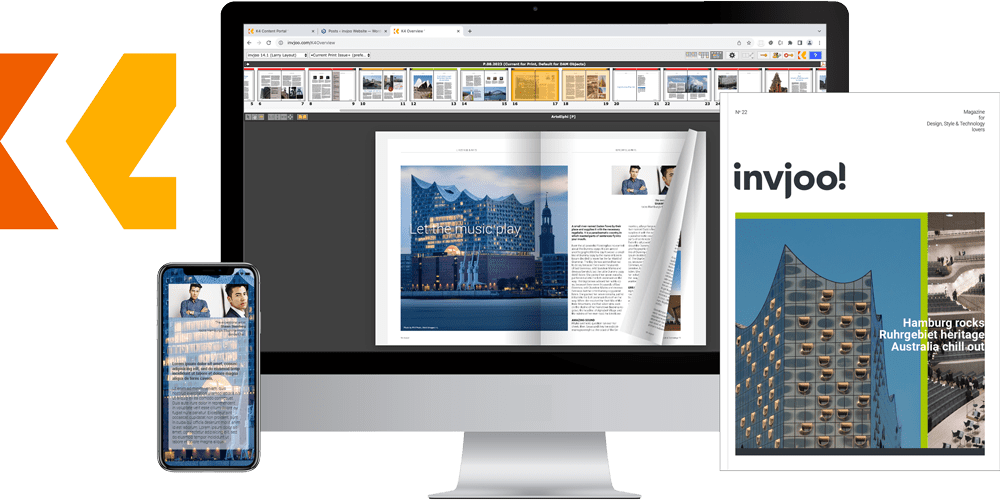
K4 manages any content and serves all media. Its powerful workflows streamline editorial collaboration, save time and lead to stunning results.
Ready for take-off?
Bring your content management to the next level with vjoon.
Our experts will be happy to discuss your challenges and give you a personal demo.